
Bitmask Javascript Example: Keeping Track of Burrito Orders. Dynamic forms and Filters.
Part 9 of 11 of a serialized version of Bitmasks for Fun and Profit: Practical Applications for Web Developers


This example uses an integer bitmask to maintain an order's state and other bitmasks for filters. The complete code listing is in the appendix in the pdf and online for the paper edition.
See it on JSFiddle:
https://jsfiddle.net/chris407x/nhdgp3f9/
This example follows several good practices:
Using a Single Source of Truth With Named Constants for Bit Values
Setting Business Rules and Filters in Bitmasks
Creating a Dynamic Form Combining Selects, Multi-Selects, and Checkboxes.
Representing Ingredients by a Specific Bit in a Bitmask, Combining Multiple Ingredients in a Single Integer Bitmask Using
OR(|).Using Bitmasks as Dynamic Filters for Missing Ingredients
Existing Orders Work Even if Ingredients Are Removed From Future Orders. No Logic Change Is Necessary.
Bitmask Filters are Combined and Compared in Single Operations
In the Burrito Ordering System, the BurritoOrder class uses bitmasks to keep track of the ingredients selected for each order. This method provides a compact representation of the order and allows for quick checking and retrieval of the selected options. The encoded bitmask is stored alongside the order name, enabling the system to effectively manage and display the orders. Everything happens in the browser; the orders do not persist. Refresh the page to clear the lists.
Using a Single Source of Truth With Named Constants for Bit Values
The BurritoOrder class is also the single source of truth. Named constants in BurritoOrder make referring to bit values simple and intuitive.
// JavaScript

class BurritoOrder {
 // Bitmask constants for each ingredient, using binary shifts
// 0001
static WHITE_BURRITO_SHELL = 1 << 0;
// 0010
static WHEAT_BURRITO_SHELL = 1 << 1;

/*  --- more ---   */

// 0001 0000 0000 0000
static LETTUCE = 1 << 12;
// 0010 0000 0000 0000
static TOMATO = 1 << 13;

 // Maps each ingredient's bitmask value to its name
 static ingredientMap = {
  WHITE_BURRITO_SHELL: {
   bit: BurritoOrder.WHITE_BURRITO_SHELL,
    name: 'White Burrito Shell'
   },
  WHEAT_BURRITO_SHELL: {
   bit: BurritoOrder.WHEAT_BURRITO_SHELL,
    name: 'Wheat Burrito Shell'
   },

/*  --- more ---   */

  LETTUCE: {
   bit: BurritoOrder.LETTUCE,
    name: 'Lettuce'
   },
  TOMATO: {
   bit: BurritoOrder.TOMATO,
    name: 'Tomato'
     }
 };
Setting Business Rules and Filters in Bitmasks
Quickly and easily create filters to create checkboxes and drop-down menus.
// JavaScript
 // Masks grouping related ingredients for form creation
 static shellsMask = BurritoOrder.WHITE_BURRITO_SHELL
         | BurritoOrder.WHEAT_BURRITO_SHELL;
 static riceMask = BurritoOrder.WHITE_RICE
         | BurritoOrder.BROWN_RICE;
 static proteinMask = BurritoOrder.CHICKEN
         | BurritoOrder.PORK
         | BurritoOrder.BEEF
         | BurritoOrder.VEGGIE_PROTEIN
         | BurritoOrder.SHRIMP;
 static checkboxMask = BurritoOrder.CHEESE
         | BurritoOrder.MILD_SALSA
         | BurritoOrder.HOT_SALSA
         | BurritoOrder.LETTUCE
         | BurritoOrder.TOMATO;
 static allMasks = BurritoOrder.shellsMask
         | BurritoOrder.riceMask
         | BurritoOrder.proteinMask
         | BurritoOrder.checkboxMask;
Creating a Dynamic Form Combining Selects, Multi-Selects, and Checkboxes.
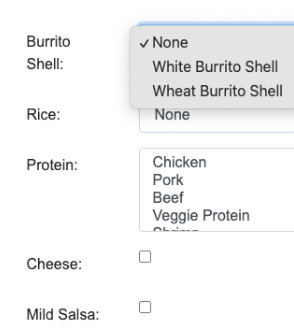
The buildForm() method dynamically builds all form elements. If you add CRICKETS as a protein to BurritoOrder and proteinMask it will automatically work in the form. You don't need to change the form logic.
selectGroups are used to create the different selects in the UI:
// JavaScript
  // Define the select groups
  const selectGroups = [
   {
     mask: BurritoOrder.shellsMask,
     id: 'burritoShell',
     label: 'Burrito Shell'
   },
   {
     mask: BurritoOrder.riceMask,
     id: 'rice',
     label: 'Rice'
   },
   {
     mask: BurritoOrder.proteinMask,
     id: 'protein',
     label: 'Protein',
     multiple: true
   }
  ];
generateSelectOptions generates the form elements:
 // Helper function to generate select options based on available ingredients
 generateSelectOptions(mask, availableOptionsMask) {
  return Object.values(BurritoOrder.ingredientMap)
   .filter(ingredient => ingredient.bit & mask && ingredient.bit & availableOptionsMask)
   .map(ingredient => `
   <option value="${ingredient.bit}">
    ${ingredient.name}
   </option>`)
   .join('');
 }
Note that value is the bitmask value of each choice:
<select class="form-control" id="protein" multiple="">
 <option value="16">Chicken</option>
 <option value="32">Pork</option>
 <option value="64">Beef</option>
 <option value="128">Veggie Protein</option>
 <option value="256">Shrimp</option>
</select>
checkboxMask and checkboxTemplate are similarly used to create the checkboxes:
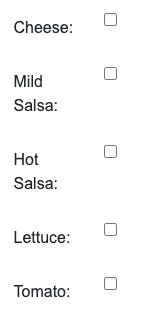
<div class="form-group row">
 </label>
 <div class="col-sm-10">
  <input type="checkbox" id="hot salsa" value="2048">
 </div>
</div>
Representing Ingredients by a Specific Bit in a Bitmask, Combining Multiple Ingredients in a Single Integer Bitmask Using OR (|).
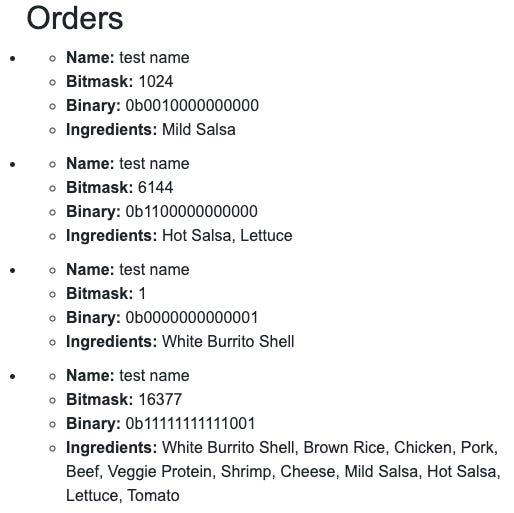
This is accomplished in encodeOrderFromForm. It loops through all the form elements and builds a single bitmask that represents the order ingredient list using the OR operator |. Note how the bits are set in the “binary” results value.
// JavaScript

 encodeOrderFromForm() {
  let bitmask = 0;

  const selects = document.querySelectorAll('select');
  selects.forEach(select => {
   if (select.id !== 'missingIngredients') {
    const selectedOptions = Array.from(select.selectedOptions);
    selectedOptions.forEach(option => {
     bitmask |= parseInt(option.value, 10);
    });
   }
  });

  const checkboxes = document.querySelectorAll('input[type="checkbox"]');
  checkboxes.forEach(checkbox => {
   if (checkbox.checked) {
    bitmask |= parseInt(checkbox.value, 10);
   }
  });

  return bitmask;
 }
}
Using Bitmasks as Dynamic Filters for Missing Ingredients
Available ingredients can be removed in real-time using a filter. This type of problem can happen in a restaurant, and this example demonstrates that you can dynamically create a filter.
This is a powerful use case for bitmasks.
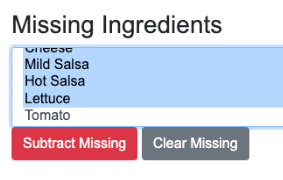
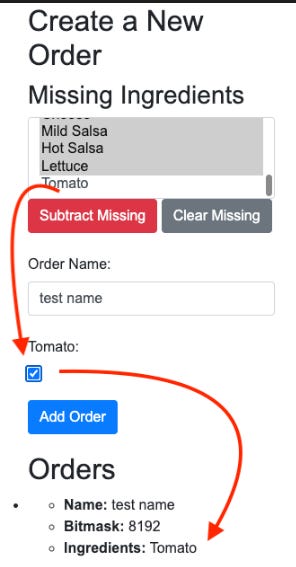
When you select from the drop-down of missing ingredients, generateMissingIngredientsMask creates a mask.
it uses selectedMissingIngredients.reduce and the OR operator | to build the mask.
The reduce() method is used to iterate through an array (selectedMissingIngredients) and accumulate a single value (mask) by applying a function (mask | parseInt(option.value, 10)) to each element of the array (option).
// JavaScript
 generateMissingIngredientsMask() {
  const missingIngredientsSelect = document.getElementById('missingIngredients');
  const selectedMissingIngredients = Array.from(missingIngredientsSelect.selectedOptions);
  return selectedMissingIngredients.reduce((mask, option) => mask | parseInt(option.value, 10), 0);
 }
Then, when the form is rebuilt with buildForm(), anything that matches the missingIngredientsMask is removed using the NOT operator ~.
// JavaScript

  selectGroups.forEach(group => {
   const availableOptionsMask = group.mask & ~missingIngredientsMask;

   // Only create the select if there are options left
   // after subtracting missing ingredients
   if (availableOptionsMask) {
 /* --- build options --- */
   }
  });

  // Create checkboxes for remaining ingredients
  // that are not in missingIngredientsMask
  Object.values(BurritoOrder.ingredientMap).forEach(ingredient => {
   if ((ingredient.bit & BurritoOrder.checkboxMask)
   && (ingredient.bit & ~missingIngredientsMask)) {
   /* --- build checkboxes --- */
   }
  });
Existing Orders Work Even if Ingredients Are Removed From Future Orders. No Logic Change Is Necessary.
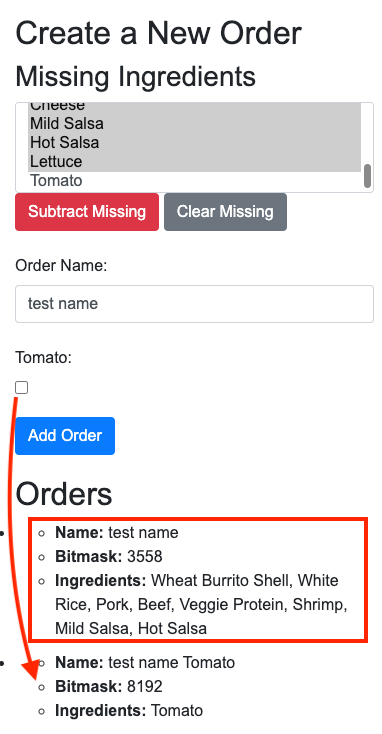
The generateMissingIngredientsMask mask will not affect existing orders. This is because BurritoOrder remains complete as a single source of truth.
Bitmask Filters Are Combined and Compared in Single Operations
For web forms and other nested logic, bitmasks offer significant power. When you have multiple sets of conditions that need to be evaluated, you can consolidate them into a single bitmask. This allows you to compare or modify multiple settings simultaneously without altering the underlying comparison logic, using bitwise operations like AND (&) or NOT (~).
You can combine different bitmasks to define product groups, enabling you to apply different rules to each group. If you need to add additional checkbox elements to your form, simply include them in the checkbox bitmask, and they will be automatically incorporated into the form logic:
// JavaScript
 // Masks grouping related ingredients for form creation
 static shellsMask = BurritoOrder.WHITE_BURRITO_SHELL
         | BurritoOrder.WHEAT_BURRITO_SHELL;
 static riceMask = BurritoOrder.WHITE_RICE
         | BurritoOrder.BROWN_RICE;
 static proteinMask = BurritoOrder.CHICKEN
         | BurritoOrder.PORK
         | BurritoOrder.BEEF
         | BurritoOrder.VEGGIE_PROTEIN
         | BurritoOrder.SHRIMP;
 static checkboxMask = BurritoOrder.CHEESE
         | BurritoOrder.MILD_SALSA
         | BurritoOrder.HOT_SALSA
         | BurritoOrder.LETTUCE
         | BurritoOrder.TOMATO;
static allMasks = BurritoOrder.shellsMask
	  	 | BurritoOrder.riceMask
  		 | BurritoOrder.proteinMask
  		 | BurritoOrder.checkboxMask;

// usage:
// This code will only execute for BurritoOrder.checkboxMask
  Object.values(BurritoOrder.ingredientMap).forEach(ingredient => {
   if ((ingredient.bit & BurritoOrder.checkboxMask) && (ingredient.bit & ~missingIngredientsMask)) {
    form.insertAdjacentHTML('beforeend', checkboxTemplate(ingredient.name, ingredient.name.toLowerCase(), ingredient.bit));
   }
  });
 }
This is part 9 of 11 of a serialized version of my book:
Bitmasks for Fun and Profit: Practical Applications for Web Developers

All code in the book is syntax highlighted and printed in full color.
I publish several books about Guitar, Music and Programming on my Author Page on Amazon:
https://www.amazon.com/stores/Chris-Adams/author/B0C3BQCYN8?&&&&language=en_US&ref_=as_li_ss_tl
Follow me at Torus Head Studios!
https://torusheadstudios.com/